
En MYETV, siempre hemos creído que internet debe ser un espacio abierto y accesible para todos. Por eso, tu cuenta de MYETV siempre será gratuita, sin suscripciones, sin tarifas ocultas, ni fechas de caducidad. Pero a medida que nuestra plataforma crece e introducimos más funciones potentes, algunas de ellas nos requieren que sepamos un poco más sobre quién eres.
Hoy, presentamos la Verificación de Identidad MYETV, un proceso único que desbloquea todo el potencial de tu cuenta, mantiene la plataforma segura para todos y nos ayuda a cumplir con las regulaciones internacionales sobre privacidad, contenido restringido por edad y comunicaciones digitales.
En esta publicación, te guiaremos a través de todo: qué cambia, qué se mantiene igual, por qué lo hacemos, cómo funciona la verificación y qué sucede con tus datos.
Tu cuenta sigue siendo gratis, siempre
Primero, resolvamos esto: nada se te quita.
Si has estado usando MYETV durante un tiempo y eliges no verificar tu identidad, tu cuenta sigue funcionando. Todavía puedes:
- Seguir y ser seguido por otros usuarios,
- Construye y gestiona tus listas de reproducción y listas de contenido,
- Navega y disfruta de la gran mayoría del contenido en la plataforma,
- Utiliza todas las funciones estándar que no requieren confirmación de edad o comprobación de identidad.
La verificación no es un muro de pago. Es una ruta de actualización, que sucede ser completamente gratis.
Lo que desbloquea la verificación
Una vez que complete la verificación de identidad, su cuenta obtiene acceso a un conjunto más amplio de funciones que simplemente no podemos ofrecer de manera responsable sin confirmar quién es usted:
📁 MyCloud Storage
Suba, almacene y gestione sus propios archivos directamente en la infraestructura en la nube de MYETV. MyCloud es un espacio personal vinculado a su identidad verificada, y mantenerlo así garantiza que sus archivos sean siempre suyos y estén protegidos.
🔞 Contenido para adultos y restringido por edad
Algo del contenido en MYETV es solo apropiado para adultos. En lugar de confiar en una simple casilla de verificación que dice "Tengo más de 18" (que cualquiera puede hacer clic), hemos implementado una verificación de edad real. Esto es mejor para los creadores que publican contenido maduro, mejor para los anunciantes y, lo que es más importante, mejor para los usuarios más jóvenes que nunca deberían encontrarlo.
🛡️ Configuración de control parental
Las cuentas no verificadas tienen un conjunto de filtros de seguridad aplicados por defecto. Los usuarios verificados pueden revisar y ajustar ciertas configuraciones de protección basándose en su edad e identidad confirmadas, dando a los adultos más control sobre su propia experiencia.
💬 Mensajería privada
La capacidad de enviar y recibir mensajes privados está reservada para usuarios verificados. Esta es una respuesta directa al creciente desafío global del acoso anónimo, el spam y las comunicaciones dañinas en línea. Saber que cada conversación de la bandeja de entrada es entre personas reales y verificadas hace que los mensajes de MYETV sean un espacio genuinamente más seguro.
📝 Publicar publicaciones y crear redes públicas
¿Quieres publicar en la línea de tiempo de tu perfil o crear una red pública a la que otros usuarios puedan unirse? Se requiere verificación. Esto evita que actores anónimos inunden la plataforma con spam, desinformación o comportamiento inauténtico coordinado, problemas que han afectado a casi todas las principales plataformas sociales.
Por qué lo hacemos
Quizás te preguntes: ¿por qué ahora? ¿Y por qué MYETV necesita saber quién soy?
Hay algunas respuestas honestas.
Primero, el panorama legal está cambiando rápido. Las regulaciones en toda la Unión Europea, el Reino Unido, los Estados Unidos, Australia y muchos otros países están exigiendo cada vez más a las plataformas que verifiquen las edades de los usuarios antes de conceder acceso a ciertos tipos de contenido o funciones de comunicación. El Digital Services Act (DSA) de la UE, la Online Safety Act del Reino Unido y marcos similares en todo el mundo están impulsando a las plataformas de todos los tamaños a tomar en serio la verificación de identidad y edad. Preferiríamos adelantarnos a esto que apresurarnos a cumplir más tarde.
En segundo lugar, la plataforma está madurando. MYETV comenzó como una plataforma de vídeo. Ha crecido hasta convertirse en algo más: una red social, un centro de creación de contenido, un servicio de almacenamiento en la nube y una comunidad. Con ese crecimiento viene la responsabilidad. Funciones como la mensajería privada y la publicación pública tienen consecuencias en el mundo real, y queremos asegurarnos de que las personas que las utilizan sean responsables, individuos reales.
En tercer lugar, queremos proteger a los usuarios más vulnerables. Los niños y adolescentes acceden a internet con menos filtros que nunca. Al implementar la verificación de edad, estamos añadiendo una capa de protección significativa, no solo simbólica.
Cómo funciona el proceso de verificación
Hemos trabajado duro para que esto sea lo más simple y libre de fricciones posible. Esto es exactamente lo que debes esperar.
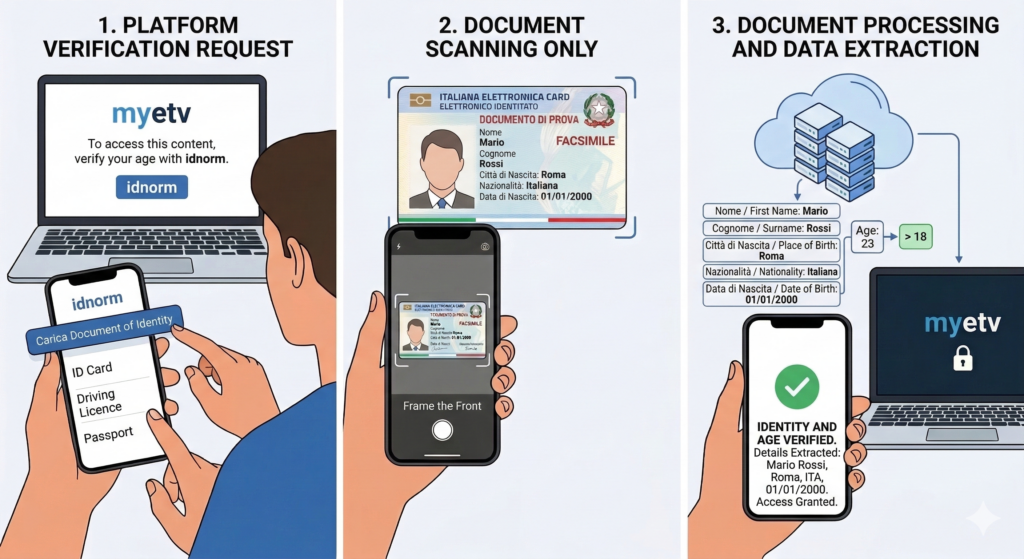
Paso 1: Iniciar la verificación
Desde la configuración de tu cuenta MYETV, navega a la sección "Información Privada" y haz clic en "Verificación de Identidad". Serás redirigido a una página de verificación segura y dedicada impulsada por nuestro socio de verificación.
Paso 2: Elige tu dispositivo
Puedes completar la verificación en tu smartphone (recomendado, ya que necesitarás fotografiar tu documento) o directamente en tu ordenador de escritorio si tiene cámara. Se mostrará un código QR en pantalla, escanéalo con tu teléfono para continuar el proceso sin problemas en tu dispositivo móvil. Alternativamente, también se proporciona un enlace directo si prefieres abrir la página de verificación directamente en tu navegador.
Paso 3: Prepare su documento de identidad
Usted necesitará un documento de identidad válido y emitido por el gobierno. El sistema admite una amplia gama de tipos de documentos en más de 220 países y territorios, incluyendo:
Europa:
- Tarjetas de identidad nacionales (Italia, Alemania, Francia, España, Polonia y la mayoría de los países de la UE/EEE)
- Pasaportes
- Permisos de residencia
Américas:
- Pasaportes (todos los países)
- Documentos de identidad nacionales (Brasil, Argentina, México, Colombia y otros)
- Licencias de conducir (EE. UU., Canadá — varía según el estado/provincia)
Asia-Pacífico:
- Pasaportes (todos los países)
- Documentos de identidad nacionales (Japón, Corea del Sur, India, Indonesia, Filipinas y muchos otros)
- Licencias de conducir (Australia, Nueva Zelanda y otros)
Oriente Medio y África:
- Pasaportes (todos los países)
- Tarjetas de identidad nacionales (EAU, Arabia Saudita, Sudáfrica, Egipto, Nigeria y muchos otros)
En general, si tienes un pasaporte válido, funcionará en todas partes. Para las tarjetas de identidad nacionales y las licencias de conducir, la aceptación depende del país emisor y del tipo de documento. El sistema de verificación admite más de 4.000 tipos de documentos a nivel mundial, por lo que la gran mayoría de las identificaciones válidas emitidas por el gobierno son aceptadas.
Asegúrate de que tu documento sea:
- No caducado,
- Claramente legible sin daños u obstrucciones significativas,
- Bien iluminado cuando se fotografía, evite el deslumbramiento, las sombras o las imágenes borrosas.
- Su nombre completo,
- Su fecha de nacimiento,
- Su nacionalidad y país de emisión,
- Su dirección (donde aparezca en el documento),
- Otros metadatos del documento para fines de validación.
- Su nombre completo verificado,
- Su fecha de nacimiento,
- Su nacionalidad,
- Su país y dirección (donde esté disponible en el documento),
- Tu género (según consta en el documento),
- Una bandera de estado de verificación y una marca de tiempo.
- Calidad de imagen deficiente (demasiado oscuro, borroso o cortado),
- Documento caducado enviado por error,
- Tipo de documento no soportado para su país,
- Retrasos en la revisión del sistema (raro, pero sucede).
Paso 4: Fotografiar su documento
Se le guiará a través de la fotografía del anverso (y reverso, si corresponde) de su documento. El proceso es paso a paso con instrucciones claras en pantalla. El sistema utiliza la captura asistida por IA para ayudarle a obtener una imagen utilizable; le informará si la foto es demasiado borrosa, demasiado oscura o está recortada.
No se requiere una selfie.
Paso 5: Procesamiento automático
Una vez que se envían las imágenes de su documento, nuestro sistema de verificación las analiza automáticamente. Esto normalmente toma menos de un minuto. El sistema lee:
En la mayoría de los casos, el resultado es instantáneo. Ocasionalmente, una presentación puede requerir una revisión adicional, lo que puede tardar un poco más. Se le notificará una vez que su verificación esté completa.
Paso 6: Hecho
Eso es todo. La verificación es un proceso único. Nunca tendrá que hacerlo de nuevo a menos que suceda algo excepcional.
Qué sucede con tus datos
Entendemos que enviar un documento de identidad en línea es un acto de confianza significativo. Nos hemos tomado eso en serio en cada paso del proceso de diseño.
Aquí está exactamente lo que sucede con su información:
Lo que almacenamos
Una vez que la verificación es aprobada, extraemos y guardamos los siguientes datos en su perfil MYETV en formato cifrado:
Estos datos se almacenan de forma segura en nuestra base de datos mediante cifrado y son accesibles solo para ti y, cuando sea legalmente requerido, para el personal autorizado de MYETV con fines de cumplimiento.
Lo que no almacenamos
No almacenamos permanentemente imágenes de su documento de identidad.
Las fotos que toma durante el proceso de verificación se utilizan únicamente para extraer los datos enumerados anteriormente. Después de una verificación exitosa, las imágenes de los documentos se eliminan permanentemente en un máximo de 30 días. No se conservan, venden, comparten ni se utilizan para ningún otro propósito.
Nunca venderemos sus datos personales a terceros. Nunca.
Nuestro Socio de Verificación
El proceso de verificación se gestiona a través de un socio de verificación de identidad seguro y compatible con el GDPR. Sus imágenes de documentos se transmiten de forma segura (cifradas en tránsito) a sus servidores de procesamiento, se analizan y luego se programan para su eliminación. MYETV solo recibe los datos estructurados y extraídos, no las imágenes sin procesar.
Existe un Acuerdo completo de Procesamiento de Datos (APD) entre MYETV y nuestro socio de verificación, según lo requerido por el Artículo 28 del GDPR.
Si algo sale mal
La verificación no siempre sale perfectamente al primer intento. Los problemas comunes incluyen:
Si tu verificación es rechazada o experimentas un problema técnico, no puedes reintentar inmediatamente por tu cuenta, esta es una salvaguarda intencional contra intentos automatizados repetidos. En su lugar, por favor contacta a nuestro equipo de soporte en:
Nuestro equipo revisará tu caso, te guiará a través de cualquier problema y autorizará manualmente un nuevo intento de verificación si es apropiado. Nuestro objetivo es responder a todas las solicitudes de soporte relacionadas con la verificación dentro de 24–48 horas.
Una Nota sobre la Privacidad y el Consentimiento
Enviar tu identidad para la verificación es totalmente voluntario. Nunca se te obligará a verificar, y tu cuenta no verificada seguirá funcionando con las características descritas anteriormente en esta publicación.
Al iniciar el proceso de verificación, usted consiente la recopilación y el procesamiento de sus datos de documentos de identidad con el fin de verificar su identidad y edad en MYETV. Puede leer más sobre cómo manejamos sus datos en nuestra Política de Privacidad.
Los datos verificados están vinculados exclusivamente a su cuenta de MYETV y no se comparten con otros usuarios, anunciantes o servicios de terceros más allá de lo estrictamente necesario para el procesamiento de la verificación.
Le proporcionamos una sección dedicada a la política de privacidad con toda la información legal
Mirando hacia adelante
La lista de funciones que requieren verificación puede evolucionar con el tiempo. Mientras continuamos construyendo MYETV, algunas nuevas funciones pueden quedar restringidas por verificación desde el lanzamiento, y podemos revisar qué funciones existentes la requieren. Siempre comunicaremos los cambios de forma clara y con un aviso razonable.
Nuestro objetivo nunca ha sido levantar muros. Es construir una plataforma donde las personas reales se sientan genuinamente seguras, donde los creadores estén protegidos, donde los niños no estén expuestos a contenido que no deberían ver, y donde la comunidad que se está formando en torno a MYETV está compuesta por individuos responsables y reales.
La verificación de identidad es un paso importante en esa dirección.
¿Listo para verificar?
Inicia sesión en tu cuenta de MYETV, ve a Mi Cuenta → Verificación de identidad, y comienza el proceso. Menos de cinco minutos, es gratis y solo tienes que hacerlo una vez.
Si tienes alguna pregunta que no se responda aquí, visita support.myetv.tv nuestro equipo estará encantado de ayudarte.
Bienvenido a la experiencia completa de MYETV.
