
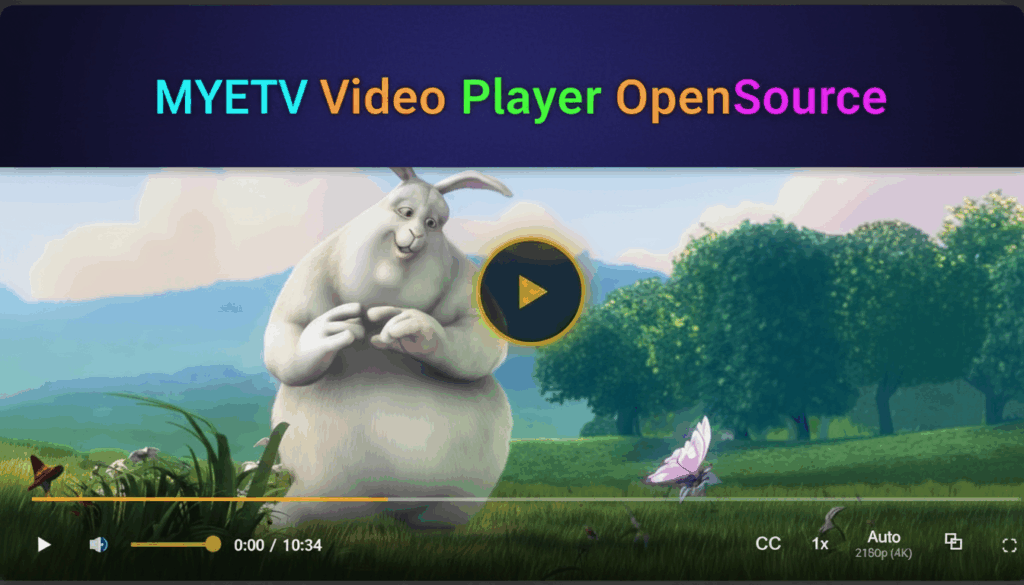
Introducing the MYETV player
The MYETV video player is a modern, HTML5-first media experience designed for fast startup, clean UI, and deep customization across web and TV surfaces, continuing the platform- [Platform: the set of the main domain and all the subdomain of a particular website; also the computer architecture and equipment using a particular operating system] - ’s long evolution from earlier HTML5 players to a fully open, extensible tool. Built on standard web technologies, it embraces captions, chapters, themes, plugins, and a documented JavaScript API so that teams can integrate, brand, and extend playback reliably across devices. The codebase will be released as open source under the MIT License- [License: a permit from an authority to own or use something, do a particular thing, or carry on a trade] - in the official GitHub repository to encourage community review, contributions, and reuse.
Github link: https://github.com/OskarCosimo/myetv-video-player-opensource/
Demo link: https://oskarcosimo.com/myetv-video-player/myetv-player-demo.html

MIT License at a glance
The MIT License is a short, permissive open-source license that allows use, copy, modification, distribution, sublicensing, and commercial use, provided the original copyright and license notice are preserved. Software- [Program/Software: the instructions that control what a computer does; computer programs] - is provided “as is,” without warranties or liability, which keeps compliance clear and lightweight for both individual developers and enterprises. This combination of flexibility and simplicity is a key reason MIT remains one of the most popular licenses for open-source projects.
Why open source
Open sourcing the player under MIT enables transparent development, lowers vendor lock-in risk, and allows community-driven improvements, including plugins and integrations inspired by vibrant ecosystems seen in widely used HTML5 players. Permissive licensing makes it easy to embed the player within commercial or closed-source stacks while still contributing back bug fixes or enhancements as desired. This approach aligns with MYETV’s history of evolving playback and UI capabilities for diverse environments.
Core architecture
The player centers on HTML5 media and standard web APIs, delivering broad compatibility and straightforward deployment on modern browsers and web views. Thanks to standards-based tracks and controls, it supports captions, chapters, and UI enhancements without proprietary runtime dependencies. The result is predictable behavior, extensibility, and a stable base for custom features and performance tuning.
JavaScript options
- Playback initialization: source URL(s), autoplay, preload, loop, muted, playsinline, brand logos, watermark logos and poster mirror familiar HTML5 properties for predictable configuration.
- UX configuration: options for control-bar visibility, button layout, keyboard behavior, inactivity timeouts, and tooltips provide fine-grained control of interaction patterns.
- Media handling: quality selection, playback-rate menus, and track menus (audio/caption) follow best practices seen in established players and toolkits.
- Event callbacks: onReady, onPlay, onPause, onEnded, onError, onRateChange, onQualityChange, onCaptionChange enable app-level orchestration and analytics hooks.
SCSS and CSS theming
Theme variables and CSS class hooks permit custom colors, typography, spacing, corner radii, and iconography, allowing seamless alignment with product brand systems. Multiple skins are supported via lightweight stylesheets so that a single build can present different looks across properties or tenants. Branding elements such as a small corner logo or watermark can be applied through options or CSS overlays.
Fully customizable logos
The player features fully customizable brand logos and watermarks.
Brand Logo: Located to the right of the control bar, it can be displayed to the left of the buttons. It can be set with an image URL (recommended size: height 44px – width 120px), a custom link, and there is a specific option to display it or not.
Watermark Logo: Positioned as desired on the video, it can be set with an image URL (recommended size: width: 180px, height: 100px), a link, a link caption, and there is an option to set its position (top left, top right, bottom left, bottom right).
Logos are optional, have an extensive API support and they are already inserted as an option when the player initializes, so no plugin is required.
Captions: VTT and SRT
The player supports text tracks with WebVTT for captions and subtitles, including multi-language menus and styling, leveraging the standard track model used across the web. WebVTT files are easy to author and maintain, and are well-suited for both captions and chapters, making them a natural fit for production pipelines. Workflows that originate in SRT can be accommodated by converting to VTT or by using ingest processes that produce both formats for maximum compatibility.
Chapters with images
Chapters are enabled via WebVTT chapter tracks, allowing quick navigation through long-form content- [Contents: every content intended as text, images, audio or video] - with clear, labeled segments. The player can show visual previews and image thumbnails alongside chapter entries to make browsing more intuitive and engaging for audiences. This approach simplifies content editing—producers update a sidecar VTT and images, and chapter UI refreshes automatically.
Control-bar buttons
- Playback: play/pause, seek, replay, and time displays are present with keyboard shortcuts for efficient navigation.
- Audio: mute/unmute and volume slider ensure consistent sound control, with optional audio-track menus when multiple tracks are present.
- View: fullscreen and picture-in-picture integrate with browser capabilities, and optional theater or fit modes help match layout needs.
- Quality and speed: bitrate/quality menus and playback-rate selection provide user agency for network- [Network of Contents: is the channel in which owners can post their content and the audience can see the contents posted by the owners] - and comprehension preferences.
- Captions: a captions menu provides on/off toggles and track selection, with styling aligned to accessibility guidance.
- Overflow: a customizable “more” menu houses advanced settings and plugin-driven actions to keep the UI focused.
Audio player with wave visualization
The player can also be used as an audio player only and has an integrated audio waveform display system without the need for any plugins; the system can still be customized by building separate plugins. Two options are set when the player is initialized: “audiofile” (true or false) will set the player up as an audio player, while “audiowave” (true or false) will display the audio waveform in the video space.
Plugin system
The plugin architecture exposes lifecycle hooks, UI injection points, and event subscriptions so new features can be added without forking core. Examples include analytics beacons, ad integrations via standardized SDKs, watermarking overlays, and custom buttons for domain-specific actions. This mirrors successful open ecosystems where community packages expand player capabilities over time.
Developer API
A concise API allows imperative control play, pause, seek, setVolume, setMuted, setPlaybackRate, setSource(s), setTrack(s), and getState plus ready/error promises for smooth bootstrapping. Event emitters mirror HTML5 semantics so app code can react to playhead changes, buffering, errors, track toggles, quality switches, and fullscreen transitions. Configuration can be supplied via JavaScript or data attributes, enabling both declarative and programmatic initialization patterns.
Accessibility features
WebVTT captions and chapter tracks improve accessibility and comprehension while enabling keyboard-friendly navigation across the player UI. Clear focus states, readable contrast, and adjustable caption styling support inclusive experiences by default. Multi-language support follows track metadata and aligns with practices used by established desktop and TV players.
Theming and branding at scale
Global CSS variables allow fast color and typography swaps so brands can maintain consistent identity across players embedded in multiple sites or apps. Skinning patterns provide greater separation between logic and style, simplifying maintenance and long-term design iteration. Organizations can standardize layouts and behaviors through theme presets while preserving room for per-page overrides.
Production workflows
Using sidecar VTT files for captions and chapters simplifies continuous publishing: editors ship updated text tracks without re-encoding media. A similar pattern applies to preview thumbnails and poster images, which can be swapped independently of video files for rapid UI iteration. These conventions align with widely adopted practices in professional video delivery pipelines.
Why this approach works
Lean, standards-based players are easier to debug, theme, and extend, and they fit well with modern CI/CD and design-system workflows. A permissive license plus a plugin-friendly core invites contributions and integrations that benefit both product teams and the broader community. Over time, this compounding ecosystem effect produces better features, docs, and stability for everyone.
Availability
The player code will be published as open source under the MIT License in the official GitHub repository, inviting issues, pull requests, and discussions from developers and integrators. The license’s simplicity makes it straightforward to embed the player across projects while honoring attribution and preserving the license text. Documentation and examples will accompany the release to accelerate adoption and customization.
A note for MYETV users
This project builds on years of iterative improvements to playback on the MYETV platform, including UI customization and player extensions that have supported branding and evolving viewing experiences. Open sourcing the player formalizes that progress and makes it easier to adopt, extend, and maintain across the web and TV environments MYETV serves. This is the foundation for a sustainable, community-driven roadmap for features and integrations going forward.
Feature checklist
- HTML5-first playback with standards-based tracks and controls for broad browser compatibility.
- Captioning with WebVTT, multi-track menus, and production-friendly VTT authoring flows; SRT-origin workflows supported by conversion or pipelines.
- Chapters with labeled segments and optional thumbnail previews for long-form navigation.
- Theming via CSS variables, skins, and brand elements such as watermarks or corner logos.
- Comprehensive controls: play/pause, seek, time, volume, mute, captions, quality, speed, fullscreen, picture-in-picture.
- Plugin architecture for analytics, ads, watermarks, and custom buttons without forking the core.
- Supports HLS or DASH streaming for compatibility with all audio/video streams
- Clear API for imperative control, events, and declarative initialization via attributes.
- MIT-licensed open-source release to encourage collaboration and flexible reuse.
Closing
Releasing the MYETV player under the MIT License invites the community to help shape a focused, fast, and extensible playback experience that teams can trust in production. With robust captions, chapters, theming, plugins, and a clean API, it is designed to be a dependable foundation for today’s web and TV applications.

