
Introduzione al Nostro Nuovo Sistema di Gestione File: Un Aggiornamento Importante per la Tua Esperienza MYCLOUD
Siamo entusiasti di annunciare un significativo aggiornamento dell'infrastruttura di MYETV che trasformerà il modo in cui gestisci, organizzi e interagisci con il tuo spazio di archiviazione cloud personale. Oggi segna il lancio ufficiale del nostro completamente ridisegnato sistema di gestione file per MYCLOUD, una soluzione potente e moderna che porta capacità di livello professionale direttamente alle tue dita.
Perché Questo Conta per Te
Se sei un creatore di contenuti su MYETV, sai che il tuo MYCLOUD privato è il cuore del tuo flusso di lavoro. È dove memorizzi i tuoi video, immagini, file audio e documenti prima di pubblicarli al tuo pubblico. È la tua area di staging personale, la tua libreria di contenuti e il tuo spazio di lavoro creativo, tutto in uno.
Fino ad ora, la gestione di questi file è stata funzionale ma un po' limitata. Abbiamo ascoltato il tuo feedback chiaramente: volevi caricamenti più veloci, strumenti di organizzazione migliori, una navigazione più intuitiva e un'interfaccia moderna che ti piacesse tanto quanto i file manager desktop che usi ogni giorno. Ci hai detto che avevi bisogno di qualcosa che potesse tenere il passo con le tue crescenti librerie di contenuti e i tuoi flussi di lavoro sempre più complessi; e abbiamo fatto molto di più, lo abbiamo reso open source e utilizzabile da chiunque.
Questo è esattamente quello che abbiamo costruito.
Incontra il Nostro Nuovo Gestore di File: Progettato per Creatori, Pensato per Tutti
Il nostro nuovo sistema di gestione file non è solo un miglioramento incrementale, ma una completa rielaborazione di come dovrebbe funzionare lo spazio di archiviazione cloud su una piattaforma di contenuti. Che tu stia caricando il tuo primo video o gestendo migliaia di file su più reti di contenuti, questo sistema si adatta alle tue esigenze.
Cosa lo Rende Speciale?
Un'Esperienza Desktop Familiare, Ovunque Tu Sia
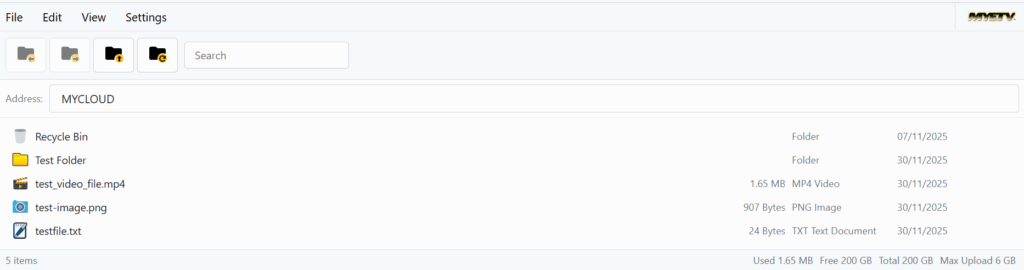
Non appena apri il tuo MYCLOUD, noterai la differenza. Scomparsa è l'interfaccia disordinata del passato. Al suo posto, troverai un ambiente di lavoro pulito e intuitivo che ti sembra il file manager sul tuo computer perché è esattamente quello che abbiamo progettato per replicare.
Ottieni alberi di cartelle, navigazione a chiocciola, funzionalità di trascinamento e rilascio e scorciatoie da tastiera che funzionano esattamente come ti aspetteresti. Vuoi selezionare più file? Tieni premuto Ctrl (o Cmd su Mac) e fai clic. Hai bisogno di selezionare un intervallo? Usa Shift. Vuoi rinominare un file? Premi F2. Queste non sono solo funzionalità facoltative, sono la memoria muscolare che hai già sviluppato, ora disponibile nel tuo browser.
Caricamenti Fulminei per File di Grandi Dimensioni
Uno dei cambiamenti più importanti è il nostro avanzato sistema di caricamento a blocchi. In precedenza, caricare file video di grandi dimensioni poteva essere stressante. Se la tua connessione si interrompeva o il tuo browser si bloccava, avresti perso tutto e dovresti ricominciare.
Non più.
Il nostro nuovo sistema divide i file di grandi dimensioni in piccoli blocchi e li carica pezzo per pezzo. Se qualcosa va storto, semplicemente riprende da dove si era interrotto. Puoi vedere esattamente quanto è stato caricato, quanto velocemente sta andando e quanto tempo rimane. Carichi un file video da 2 GB? Nessun problema. Il tuo browser si blocca all'85%? Nessun problema, ricarica la pagina e finirà l'ultimo 5%.
Questa tecnologia è la stessa utilizzata dai principali fornitori di archiviazione cloud, e ora è integrata nel MYCLOUD.
Supporto Multilingue per la Nostra Comunità Globale
``````htmlMYETV è sempre stata orgogliosa della sua comunità diversificata e internazionale. Questo è il motivo per cui il nuovo gestore di file viene visualizzato automaticamente nella tua lingua preferita. Che tu abbia impostato l'interfaccia di MYETV in inglese, italiano, spagnolo, tedesco, francese, portoghese, cinese, giapponese o russo, l'interfaccia di MYCLOUD si adatta istantaneamente.
Non più costretti a lottare con una terminologia sconosciuta o a cercare di indovinare cosa fanno i pulsanti. Tutto è presentato nella lingua con cui ti senti più a tuo agio, rendendo la gestione dei file naturale ed efficace.
Strumenti di Organizzazione Intelligenti
La gestione di centinaia o migliaia di file richiede strumenti di organizzazione intelligenti, e ne abbiamo inseriti molti in questo nuovo sistema:
- Ricerca Potente: Trova qualsiasi file istantaneamente per nome, anche se è sepolto in profondità nelle sottocartelle
- Ordinamento Flessibile: Ordina per nome, dimensione, data o tipo di file con un solo clic
- Modalità di Visualizzazione Multiple: Passa da una vista dettagliata dell'elenco per una gestione precisa o da una vista a griglia per la navigazione visiva
- Sistema Trash: Hai accidentalmente eliminato qualcosa? Nessun panico, i file eliminati vanno in una cartella trash dove puoi ripristinarli prima che vengano rimossi in modo permanente
- Operazioni in Batch: Seleziona più file ed esegui azioni su tutti loro contemporaneamente copia, sposta, elimina o scarica in blocco
Progettato per Creatori Singoli e Team
Uno degli aspetti più potenti del nostro nuovo sistema è come gestisce senza problemi i diversi casi d'uso.
Per Creatori Individuali:
Il tuo personale MYCLOUD rimane completamente privato. Solo tu puoi accedere ai tuoi file. È il tuo spazio di lavoro personale dove puoi sperimentare, organizzare bozze e preparare contenuti prima di renderli pubblici. Il gestore di file rispetta la tua privacy, nessuno può sbirciare nelle tue cartelle, nemmeno altri utenti MYETV.
Per Proprietari di Network- [Network of Contents: is the channel in which owners can post their content and the audience can see the contents posted by the owners] - di Contenuti:
Se gestisci un network di contenuti pubblico su MYETV, sai che la collaborazione è essenziale. Il nuovo gestore di file rende la collaborazione di squadra senza sforzo. I proprietari di rete possono accedere allo storage MYCLOUD condiviso insieme ai loro membri del team, facilitando la coordinazione della produzione di contenuti, la condivisione di risorse e il mantenimento di una libreria centrale di materiali.
Il sistema ti mostra in modo intelligente quali cartelle appartengono al tuo account- [Account: an Account contains the personal information that is assigned to those who register and access with email and password] - personale e quali sono risorse di rete condivise, tutto nella stessa interfaccia unificata. Non devi più passare tra diversi sistemi o perdere traccia di dove sono memorizzati i file.
La Tecnologia Dietro la Magia: Perché Abbiamo Optato per il Codice Aperto
Ecco qualcosa che potresti non sapere: il gestore di file che alimenta la tua esperienza MYCLOUD non è solo costruito su misura per MYETV, ma è anche completamente open source. Non lo stiamo solo utilizzando; lo stiamo condividendo con il mondo.
Perché il Codice Aperto è Importante
Quando abbiamo deciso di costruire questo nuovo sistema, avevamo una scelta: concedere in licenza una soluzione commerciale esistente o costruirne una da zero. Abbiamo scelto quest'ultima, e poi siamo andati oltre rilasciando il nostro codice al pubblico.
``````htmlTrasparenza e Fiducia
Rendendo il nostro file manager open source, invitiamo l'intera comunità di sviluppatori a esaminare come funziona. I ricercatori della sicurezza possono effettuare audit del codice per vulnerabilità. Gli sviluppatori possono suggerire miglioramenti. E chiunque sia curioso può semplicemente sfogliare il codice sorgente e vedere esattamente cosa sta succedendo dietro le quinte.
Questo livello di trasparenza crea fiducia. Non stai semplicemente accettando la nostra parola che i tuoi file sono sicuri, puoi verificarlo tu stesso o chiedere a qualcuno di cui ti fidi di farlo per te.
Innovazione Guidata dalla Comunità
Open source non significa solo trasparenza, significa collaborazione. Sviluppatori di tutto il mondo possono contribuire miglioramenti, correggere bug e aggiungere funzionalità. Le migliori idee vincono, indipendentemente da dove provengono. Ciò significa che il nostro file manager beneficia dell'intelligenza collettiva di una comunità globale, non solo del nostro team interno.
Gratuito per Tutti
Forse più importante di tutto, rilasciando questo come open source con la Licenza MIT, stiamo restituendo alla comunità che ha sostenuto MYETV. Altre piattaforme, sviluppatori e progetti possono utilizzare il nostro file manager liberamente. Possono imparare da esso, costruirci su o integrarlo nei propri sistemi.
Puoi esplorare il codice sorgente completo, la documentazione e i dettagli tecnici nel nostro repository GitHub: https://github.com/OskarCosimo/My-File-Manager-Opensource
Il repository include una documentazione completa che copre tutto, dall'impostazione di base alla personalizzazione avanzata. Che tu sia uno sviluppatore curioso di come funziona o un imprenditore alla ricerca di una soluzione di gestione dei file per il tuo progetto, è tutto lì, liberamente disponibile. Si prega di notare che il repository è attualmente in costruzione.
Sicurezza e Privacy: I Tuoi File, Il Tuo Controllo
Sappiamo che fidarsi di una piattaforma con i tuoi contenuti è una decisione importante. Ecco perché abbiamo costruito la sicurezza in ogni livello del nostro nuovo file manager.
Molti Strati di Protezione
Autenticazione e Autorizzazione
Prima di poter accedere a qualsiasi file in MYCLOUD, il sistema verifica la tua identità e controlla le tue autorizzazioni. Ogni richiesta, che tu stia caricando, scaricando o semplicemente visualizzando un file, viene sottoposta a rigorose verifiche di sicurezza.
Protezione dal Traversamento del Percorso
Una delle vulnerabilità di sicurezza più comuni nei sistemi di gestione dei file è chiamata "traversamento del percorso", in cui gli utenti malintenzionati cercano di accedere a file al di fuori delle cartelle autorizzate. Il nostro sistema ha una protezione robusta contro questo, garantendo che gli utenti possano accedere solo ai file per i quali sono espressamente autorizzati a vedere.
Validazione del Tipo di File
Non tutti i tipi di file sono creati allo stesso modo. Alcuni possono rappresentare rischi per la sicurezza se caricati su un server. Il nostro sistema esegue una rigorosa validazione di ogni file caricato, controllando sia l'estensione del file che il contenuto effettivo del file per garantire che sia quello che afferma di essere. I tipi di file pericolosi vengono bloccati automaticamente.
Limiti di Dimensione e Gestione delle Quote
Ogni account MYCLOUD ha limiti di spazio di archiviazione e il nostro sistema applica questi limiti rigorosamente ma in modo equo. Puoi sempre vedere quanto spazio hai utilizzato e quanto ne è rimasto disponibile. Quando ti avvicini al limite, il sistema ti avvisa prima che lo raggiunga.
Cosa Ne Sulla Crittografia?
``````html
Potrebbe piacervi sapere riguardo alla crittografia dei file. Il nostro file manager open source include infatti funzionalità di crittografia end-to-end potenti, utilizzando la crittografia AES-256-GCM standard del settore. Tuttavia, per l'implementazione di MYETV, abbiamo fatto una scelta deliberata di non abilitare questa funzionalità.
Ecco perché: la crittografia aggiunge complessità e può influire sulle prestazioni, soprattutto quando si accede e si pubblicano frequentemente file al vostro pubblico. Per la maggior parte dei casi d'uso di MYETV, l'archiviazione di video, immagini e contenuti destinati alla condivisione pubblica, il sovraccarico della crittografia non offre vantaggi significativi.
I vostri file sono già protetti da più livelli di sicurezza, memorizzati su server sicuri e accessibili solo agli utenti autorizzati. La funzionalità di crittografia rimane disponibile nel codice open source per chiunque ne abbia bisogno per diversi casi d'uso, ma per le specifiche esigenze di MYETV, abbiamo ottimizzato per velocità e usabilità invece.
Performance Che Scala Con Te
Che tu stia caricando un'immagine singola o gestendo una libreria di centinaia di video, il nostro nuovo file manager mantiene prestazioni eccellenti.
Chunking Intelligente
I grandi caricamenti di file utilizzano il nostro sistema di chunking intelligente, che divide automaticamente i file in pezzi di dimensioni ottimali. Questo non riguarda solo l'affidabilità, ma anche la velocità. Caricando più chunk in parallelo (quando possibile), massimizziamo l'utilizzo della larghezza di banda e riduciamo i tempi di caricamento.
Elenco File Efficiente
Anche se hai migliaia di file nel tuo MYCLOUD, l'interfaccia rimane veloce e reattiva. I file vengono caricati e renderizzati in modo efficiente, con scorrimenti fluidi e interazioni istantanee. I risultati di ricerca appaiono in millisecondi, non in secondi. Due diversi elenchi di file: "list: elenco di file" e "grid: icone grandi".
Utilizzo Minimo delle Risorse
Abbiamo ottimizzato il codice client-side per utilizzare risorse del browser minime. Puoi lasciare l'icona di MYCLOUD aperta tutto il giorno senza preoccuparti di perdite di memoria o degrado delle prestazioni. Il sistema utilizza tecnologie web moderne e le migliori pratiche per fornire un'esperienza fluida su qualsiasi dispositivo.
Cosa Succede Dopo: Miglioramento Continuo
Questo lancio è solo l'inizio. Poiché il nostro file manager è costruito su un'architettura moderna e modulare, possiamo continuare ad aggiungere funzionalità e miglioramenti senza interrompere il vostro flusso di lavoro.
Miglioramenti Pianificati
Stiamo già lavorando a diverse aggiunte entusiasmanti:
- Capacità di anteprima migliorate: visualizza più tipi di file direttamente nel tuo browser senza doverli scaricare per primi
- Filtri di ricerca avanzati: trova file in base alle dimensioni, agli intervalli di date o ai tipi di file
- Visualizzazioni personalizzabili: scegli quali colonne visualizzare e come organizzare il tuo spazio di lavoro
- Riferimento ai tasti di scelta rapida: una guida integrata per aiutarti a padroneggiare i shortcut di produttività
Il Tuo Feedback Modella la Nostra Roadmap
Stiamo ascoltando. Mentre utilizzi questo nuovo sistema, vogliamo sapere cosa funziona bene, cosa potrebbe essere migliorato e quali funzionalità renderebbero il tuo flusso di lavoro ancora più fluido.
```htmlIl tuo feedback influenza direttamente le nostre priorità di sviluppo. Le migliori idee dalla nostra comunità spesso diventano le funzionalità che costruiamo successivamente.
Inizia Subito: È Già Qui
La cosa migliore? Non devi fare nulla per accedere a questo nuovo sistema. È già attivo nel tuo MYETV account.
Semplicemente accedi a MYETV, vai alla sezione MYCLOUD e vedrai immediatamente l'interfaccia nuova. Tutto ciò che ti è familiare è ancora lì, tutti i tuoi file, cartelle e contenuti sono esattamente dove li hai lasciati. La sola differenza è che ora hai gli strumenti potenti per gestirli.
Se sei nuovo su MYETV, creare un account ti dà automaticamente accesso al tuo personale MYCLOUD con questo nuovo gestore di file incluso.
Una Piattaforma Costruita da Creatori, per Creatori
Questo aggiornamento rappresenta più di una semplice nuova tecnologia, rappresenta il nostro impegno a fornire a MYETV ai creatori strumenti di livello professionale. Crediamo che un ottimo contenuto meriti ottimi strumenti e che gestire il tuo lavoro creativo non dovrebbe essere una frustrante sfida tecnica.
Combinando la tecnologia web moderna, i principi open source e un design incentrato sui creatori, abbiamo creato qualcosa di cui siamo veramente orgogliosi. Qualcosa che rende il tuo flusso di lavoro quotidiano più fluido, i tuoi caricamenti più affidabili e la gestione dei tuoi contenuti più intuitiva.
Unisciti alla Comunità Open Source
Anche se non sei uno sviluppatore, puoi comunque far parte del successo di questo progetto. Condividi la tua esperienza con il nuovo gestore di file. Fai conoscere la versione open source. Suggerisci funzionalità. Segnala bug. Ogni contributo, per quanto piccolo, aiuta a rendere questo sistema migliore per tutti.
Per gli sviluppatori nella nostra comunità, accogliamo particolarmente il vostro interesse ad esplorare il codice sorgente, contribuire miglioramenti o persino creare i vostri progetti utilizzando il nostro lavoro come base. La licenza MIT vi dà la completa libertà di utilizzare questo codice come preferite.
Conclusione: Il Futuro della Gestione dei Contenuti
Man mano che la creazione di contenuti continua ad evolversi e il pubblico richiede una qualità più elevata in tutti i formati, avere un'infrastruttura robusta diventa sempre più importante. Con questo nuovo sistema di gestione dei file, MYETV è pronta a sostenere qualsiasi cosa il futuro dei contenuti online porti.
Che tu stia caricando video 4K, foto ad alta risoluzione, registrazioni audio professionali o qualsiasi altro tipo di media, il tuo MYCLOUD ora ha il potere e la flessibilità per gestirlo con grazia.
Siamo entusiasti di questo nuovo capitolo e non vediamo l'ora di vedere come utilizzerai questi nuovi strumenti per creare contenuti incredibili.
Benvenuto nel futuro della gestione dei file su MYETV. Benvenuto nel nuovo MYCLOUD experience.
Vuoi provarlo da solo? Accedi al tuo account MYETV e esplora il tuo MYCLOUD aggiornato. E non dimenticare di dare un'occhiata al progetto open source su GitHub, chissà, potresti essere ispirato a contribuire a qualcosa che milioni di creatori utilizzano ogni giorno.
```Domande o feedback? Ci piacerebbe ricevere il tuo feedback nei commenti tramite i nostri canali di supporto. Buon divertimento!
My File Manager Opensource è disponibile sotto la licenza MIT su https://github.com/OskarCosimo/My-File-Manager-Opensource
Grazie per aver letto.
